Message banking was developed at Boston Children's Hospital as a way for people with ALS (MND) to keep recordings of their own voice, with their own emotion, for use later.1 A recorded message can't say anything new,2 so many people also use a synthetic voice.
Ideas for what to record
Names and greetings
- The names of the people you talk to most, the way you say them, including nicknames.
- How you say hello and goodbye: "Hi, love." "Morning, mate." "See you later, alligator."
- How you answer the phone.
Things you say to family and friends
- "I love you." "I'm proud of you." "Love you loads."
- Goodnight routines and bedtime phrases. The MND Association suggests reading a bedtime story as an example.3
- Encouragement: "You've got this." "Good luck today."
Familiar sayings and sounds
- Catchphrases, sayings and jokes only your family understands.
- Reactions: "You're kidding!" "Oh, for goodness' sake." "Brilliant."
- Sounds that aren't words: a laugh, a sigh, a "hmm", a whistle.3
- How you call the dog or the cat.3
Everyday needs
- "Can you help me with this?" "I'm fine, just tired." "Not now, thanks."
- Things you'll want to say to carers or nurses, in your own voice.
Things for later
- Messages for birthdays or special occasions.
- Favourite prayers, songs, poems or lines from films.
Tips for good recordings
- Pick a good timeRecord when you're rested. If your voice tires through the day, mornings are often best.
- Find a quiet spotA room with curtains, carpet or soft furniture, away from fridges, fans and televisions.
- Hold the phone steadyAbout a hand's width from your mouth, a little to one side so breath doesn't pop into the microphone.
- Say it naturallyIt can help to imagine saying it to the person.
- Listen backCheck each take before moving on. Redo any with background noise.
- Label clearlyName each recording so you can find it fast later.
- Back upKeep a copy somewhere other than the phone.
How to record in Dawn
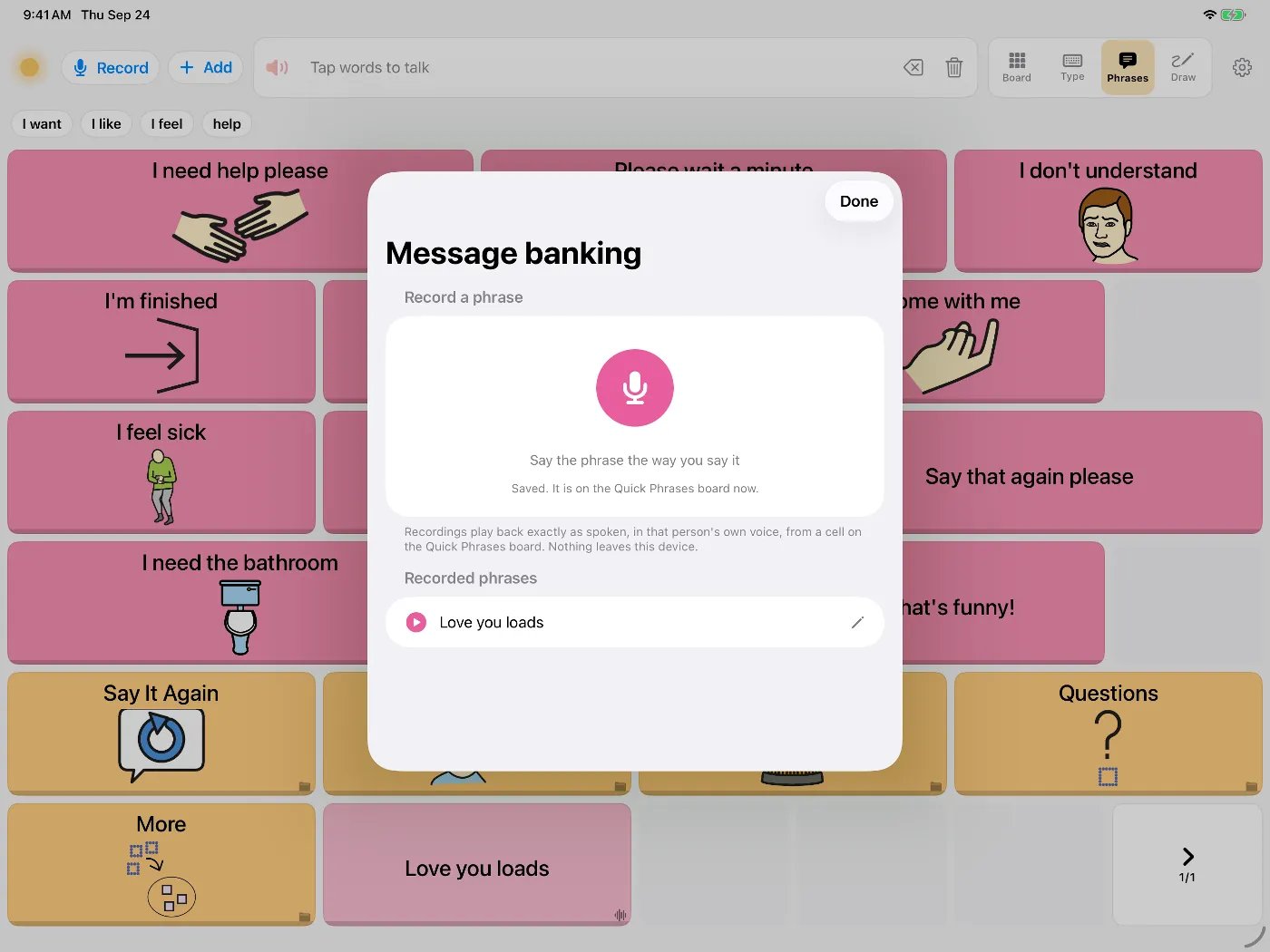
- Open the Phrases tab and tap Record.
- Say the phrase aloud in your usual voice.
- Dawn saves it as a button on the Quick Phrases board, marked with a small waveform. Rename it so it's easy to find.
- Make a backup in Settings, then Data & Backup. Recordings are included.
For messages you haven't recorded
Dawn can also build a synthetic voice from your speech for anything you type. Making a voice in Dawn.